The history of every component, from the day it arrives to the day it leaves.
The GearLibrary archive is not a list of objects: each component has its own record with photos, version, documents, measurements and repairs, and the record follows it even when you sell it.
A record, for example
A demo record as the app shows it. Component, brand and data are invented.
Corvina TD-2
belt-drive turntable, 33⅓ and 45 rpm
Version: second series, 220 V verified
| Category | Turntable |
|---|---|
| Serial no. | TD2-04127 |
| Inventory no. | 027 |
| Purchase | 14/03/2021 · €380 |
| Source | flea market, Pavia |
| Estimated value | €520 |
| Loan | at home |
Specifications to be checked
| Drive | belt, 16-pole synchronous motor |
|---|---|
| Platter | 1.4 kg, die-cast aluminium |
| Wow & flutter | ≤ 0.07 % (DIN weighted) |
| Rumble | ≤ −65 dB (DIN B) |
- Corvina TD-2 — operating instructions
manual · 24 pages - Corvina TD-2 — service manual
schematic / service · with the motor supply schematic - Setting VTA, technical note
document · also linked to the tonearm
Parts list from the schematic
38 parts · reliability 94 % · 2 to check
Circuit analysis
Signal pathPower supplyVoltages on the schematicCritical points for restoration
Measurements it appears in
| Date | Type | Measurement | Details |
|---|---|---|---|
| 02/10/2026 | Turntable bench | After the new belt | 33⅓: +0.08 % · W&F 0.06 % |
| 18/06/2026 | Turntable bench | As bought | 33⅓: −0.9 % · W&F 0.14 % |
| 18/06/2026 | Cartridge alignment | Azimuth | crosstalk L→R −27 dB · within limits |
The two bench measurements show the effect of the new belt.
Spare parts and repairs
| Date | Item or repair | Supplier |
|---|---|---|
| 28/09/2026 | Replacement flat belt | online parts shop |
| 28/09/2026 | Spindle cleaned and oiled | — |
| 10/05/2026 | Perspex dust cover | flea market |
Sale
- For sale since 05/11/2026 at €560 (negotiable)
- Listed on 2 sites · 1 offer
- Estimated profit against the cost, spare parts included
- 01 · Photos, data, version
Into the collection
Photograph the component, including the rating plate on the back: artificial intelligence reads logos, model codes and the serial number and suggests make, model, category and version. You check and save.
- Make, model, version (MK II, first series, European version…), serial number and inventory number
- Purchase: date, source, price in any currency converted to euros at that year’s average rate
- Estimated value and loans (“lent to…”, empty = at home)
- For cartridges and tonearms: mass, compliance and effective mass, used by the arm–cartridge compatibility check
- Specifications looked up with AI: features, versions released and how to tell them apart, history of the brand and of the product, with sources
What the AI finds stays “to be checked” until you mark it as verified. It needs your own Gemini key.
- 02 · Manuals, schematics, papers
Documentation
User manuals, service manuals, schematics and technical papers live in the Documents section and, when you link them, in the component’s record as well.
- Search by title, author, component and notes; alphabetical index and filters by file type and source
- From the schematic, the parts list extracted with AI: reference, value, specifications, stage
- Reliability check: the AI reads the schematic again, looks for other sources and flags the entries to check
- Circuit analysis: signal path, power supply, voltages on the schematic and critical points for restoration, as a PDF
- Check for duplicates and for documents left without a file
- 03 · The link with the tools
Measurements and alignment
When you measure on the bench, you choose which components of the collection are involved. From then on the measurement also appears in their records.
- Turntable bench: speed, wow & flutter, crosstalk, harmonics, VTA
- Reel-to-reel recorder alignment, step by step
- Cartridge alignment (VTA and azimuth) with the result
- Room acoustics, with the speakers measured
So you can see how a component was before and after a repair, without digging through folders.
- 04 · Spare parts and repairs
Maintenance
Every spare part and every repair has a date, an item and a supplier, and is linked to the component. Maintenance notes stay in the record.
- Spare parts in the Log, linked to the component
- Cost of spare parts included in the account when you sell
- Free notes and maintenance in the record
- 05 · Listing, sheet, accounts
Sale
“Put up for sale” prepares the listing and keeps track of price, sites and offers. Once sold, the component leaves the collection but stays in the sold archive with its whole history.
- Listing text with the verified specifications, ready to copy
- Zip package for the buyer: numbered photos, PDF sheet, manuals and schematics, measurement reports
- PDF sheet for the buyer without prices, source, inventory number or your name; serial number optional
- Asking price over time, fees, shipping and net income; profit or loss against the cost, spare parts included
- Private sale receipt as a PDF, as a template to adapt
The PDF dossier
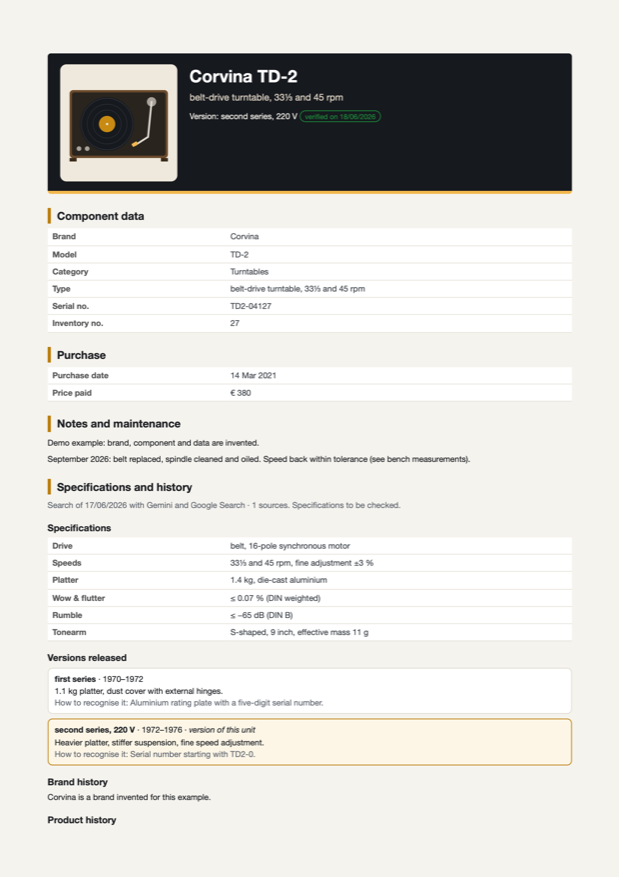
From every record the app creates a PDF dossier: data, photos, version, specifications and history, spare parts, alignments, measurements and attached documents. You can include purchase date and price or leave them out; for a buyer, the version without personal data.
- With or without purchase data
- Sale version, without prices or name
- Main photo and gallery
Download the example dossier A4 PDF · invented component
Finding and counting
The collection can be browsed as a list or as a table.
- Search by make, model, serial number and notes
- Filter by category and sort, by cost too
- Total number of pieces and total value, with a button to hide the figures
- Components for sale highlighted, with a link to the sales
The wish list
What you are looking for goes in Log → Wishes, optionally linked to something you already own (a cartridge for your tonearm, a spare part).
- eBay offers searched only when you press the button, never automatically
- Search regions, minimum and maximum price, words to avoid
- “Got it” once you have found it
Your data stays yours
The archive lives on your devices. There is no GearLibrary server holding your collection.
- Synchronisation between computer, iPhone and iPad through your Google Drive
- Full backup in a single file, to keep wherever you like
- Artificial intelligence only with your own Gemini key, stored in the system keychain
- eBay searches only when you ask for them
The archive is available on computer (Windows and Mac) and on iPhone and iPad.
The tools that fill the archive
Some tools write straight into the archive.
Turntable bench
Test-record measurements go into the records of the turntable, tonearm, cartridge, phono preamp and step-up used.
Go to the tool →Reel-to-reel recorders
The tape archive, also from a photo of the box, and the alignment in the recorder’s record.
Go to the tool →Tubes
Measurement archive and matching, with files from the eTracer and uTracer curve tracers.
Go to the tool →Room acoustics
Room measurements appear in the records of the speakers measured.
Go to the tool →